Train New FBA Prep Staff Quickly in 5 Shifts
Most prep centres train by shadowing, then wonder why new hires still ask basic questions on day three. The truth is simple: following a person teaches preferences, including printing labels, not the path your operation needs to scale. If the system is the source of truth, training must live in that system. New staff should learn how shipments advance, where statuses change, and how tracking and payments get recorded, all inside the same workflow they will use on the floor.
When you teach this way, shadowing becomes context instead of the curriculum. Instead of memorizing tribal tricks, new hires build confidence by doing the right action at the right moment, with the screen guiding the next step. The payoff shows up quickly: fewer interruptions, cleaner handoffs, and a first week that looks productive, not precarious.
Key Takeaways:
- Train inside your live system so new hires learn the exact actions that move shipments forward
- Replace long slide decks with repeated reps in the workflow to build speed and confidence
- Quantify the inbox tax and rework cost to create urgency for a better onboarding plan
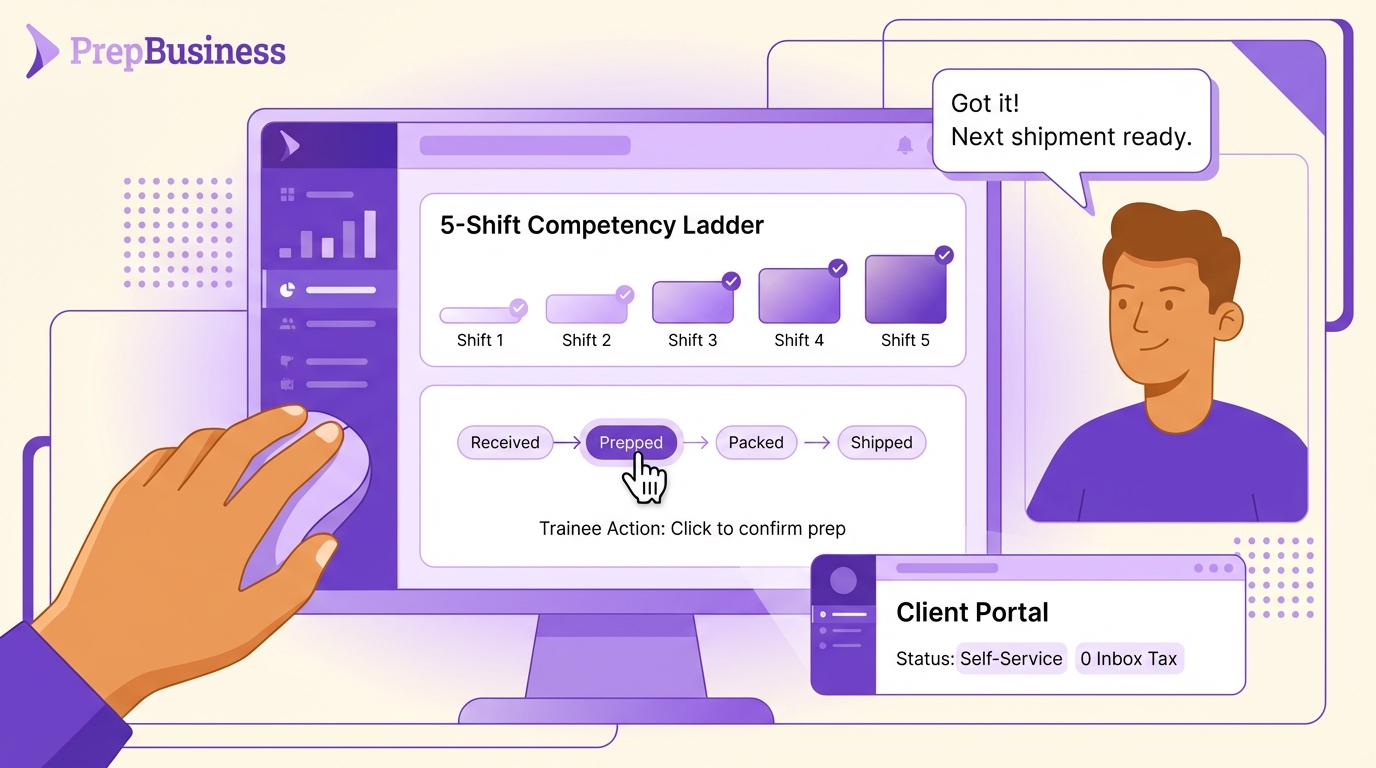
- Define a five-shift target and a simple competency ladder to measure progress
- Show trainees the client portal view so status emails are replaced by self-service
- Tie tracking and payments to the shipment record to reduce disputes and month-end drag
- Use PrepBusiness to centralize work, expose live status to clients, and accelerate ramp time
Why Shadowing Alone Slows Ramp Time
Make the system do the talking
Most teams assume shadowing is the fastest way to ramp. It is familiar but it hides the actual workflow behind personal habits. Walk new hires through the same screens you expect them to use on day one. Show where shipments live, how statuses move, and where tracking and payments sit. The system becomes the instructor, so shadowing adds context without dictating the method. The result is fewer “what do I do next?” interruptions and faster independent work.
Reps in the live system
Speed comes from repetition, not from watching. Have new staff click through core actions until it feels automatic: find a shipment, confirm receiving, move to prep, advance to dispatch. Short, repeated reps reduce hesitation, which is the hidden drag on throughput during week one. You are wiring muscle memory for the exact flow that keeps your floor moving.
Trust the portal, not ad-hoc emails
Teach a simple rule early: clients do not need one-off status messages. When staff trust that status is visible in the portal, they stop composing updates and keep work moving. This small mindset shift changes the day. Operators spend time advancing shipments, not forwarding screenshots or writing explanations.
Teach The System, Not Tribal Tricks
Decompose SOPs into micro-lessons
Break SOPs into 10–15 minute micro-lessons that mirror real stages: receiving, including account details, labeling, bundling, packing, dispatch, billing. Each micro-lesson ends with a hands-on task inside the software. Assign a single, visible competency to each lesson so progress is obvious to trainers and trainees alike. Keep printed SOPs short and system-centered with screenshots and two or three rules of thumb per stage to reinforce consistency.
- Core competencies to track:
- Can create or find a shipment and identify assigned work
- Can update counts and move items to In Prep
- Can confirm cartons, record tracking, and verify visibility in the portal
Embed guided workflows and checklists
Treat statuses and shipment records like checklists. In receiving, open the shipment and walk through every field that must be current. In prep, let stage transitions guide actions. Use two one path, one truth rules: if it is not in the shipment record, it is not real, and if a status changes, update it now, not later. These rules eliminate rework, speed handoffs, and make exceptions obvious.
Point clients to the portal from day one
Normalize self-service. During client onboarding, include a portal link in the welcome message and in your email footer so customers know where to check status. Coach new staff to reference the portal when confirming progress. A quick review of the portal view helps trainees understand what clients see, which fields matter most, and why timely updates reduce noise.
The Hidden Costs Of Slow Onboarding
Calculate the inbox tax
Routine status checks consume real labor. Imagine 100 shipments per week. Two questions per shipment at three minutes to confirm and reply equals 600 minutes, which is 10 hours of administrative time. Add interruptions and context switching and the cost rises. Stretch onboarding by weeks and you multiply that tax when trainees need extra hand-holding to answer questions the system could answer automatically.
Quantify rework and errors from stale data
Errors typically trace back to missing or outdated information. New hires who work from memory or spreadsheets create double entry and missed items. Tie every error to a structural cause, not a person. Fixing structure removes error patterns, and trainees learn faster when the workflow forces correct behavior.
- Common root causes to log and solve:
- No single source of truth for shipments and counts
- Status not updated at the moment of work
- Tracking recorded in an email or separate sheet
- Billing raised without tying charges to shipped work
Model the ramp curve and labor cost
Define a five-shift target. By the end of shift five, the trainee advances shipments through dispatch and records tracking with only spot checks. Anything slower has a cost. Build a simple model to quantify it and use it to align managers and owners.
- Ramp model checklist:
- Baseline cartons per hour before and during training
- Estimate trainer time lost to status checks and rework
- Multiply the weekly delta by hires per quarter to size payback
What A Confident First Week Looks Like
Day 1–2: clarity on status and next actions
New hires log in, find their work, and see the next best action on screen. They move items from receiving to prep, including charges billing, then to dispatch, capturing status changes as they go. Trainers step in only for exceptions. Short huddles begin with “what is stuck?” and end with a clear plan because the system shows the truth. Trainees learn to trust the shipment record over verbal notes, which accelerates competence.
Manager’s view: fewer interruptions, smoother handoffs
When all work lives in one place, leads scan the queue and reassign quickly. No hunting across tabs or reconciling counts. Handoffs happen on time because statuses reflect reality. Trainers invest time in edge cases, not in rebuilding updates in spreadsheets or writing lengthy messages. Weekly exception reviews turn into quick teachable moments that raise the whole team.
Client’s view: less noise, more trust
Clients check their portal for updates, so “Is it out yet?” disappears. Tracking sits next to the shipment, which gives instant proof without back-and-forth. Billing aligns to shipped work, so month-end disputes fade. Transparency builds trust and reduces the need for ad-hoc communication.
Run The 5-Shift Curriculum
Shifts 1–2: receiving and labeling basics
Shift 1 sets the foundation. The trainee navigates the operations hub, locates assigned shipments, and records received quantities accurately. They advance status to In Prep and confirm that the change is visible. Reinforce accuracy by spot checking one SKU per case. Introduce live inventory tracking so trainees see how counts and statuses feed the rest of the workflow.
Shift 2 focuses on labeling. The trainee applies labels, confirms completion in the system, and understands how prep status drives dispatch readiness. A quick reference to practical guidance on printing labels speeds the learning curve. Keep it simple. One path, one truth in the software. End with a short quiz: Where do you verify counts, how do you advance status, when do you escalate an exception?
Shifts 3–4: bundling and packing/cartonization
Shift 3 covers bundling and kit rules. Trainees execute the rules and mark completion in the workflow. Emphasize moving the item once and updating status once to avoid double handling. Review two bundles as quality gates and record learnings in the shipment notes field so the next role sees the context.
Shift 4 is about packing and carton confirmation. The trainee verifies counts against the shipment record, prepares cartons, and advances to dispatch. If something does not line up, the shipment record exposes the gap and drives a clean correction. The goal is consistent, predictable movement from prep to dispatch with minimal managerial intervention.
Shift 5: dispatch, tracking capture, and billing handoff
Shift 5 completes the loop. The trainee finalizes cartons, records tracking numbers within the shipment record, and confirms visibility in the client portal. A quick walk-through of shipping tracking reinforces the habit: record tracking in the right place immediately so clients and managers see it without asking. Tie this to billing by showing how charges connect to shipped work, then verify the link in the system.
The final step is proof of readiness. Run one full end-to-end flow with a supervisor watching quietly. Add a brief scenario drill and make the answer the shipment record, not an inbox search. You can note a concise competency matrix inside your training doc: records counts without prompts, updates status immediately, captures tracking within two minutes of dispatch, clears two exceptions with minimal guidance.
How PrepBusiness Powers The 5-Shift Onboarding
Centralize shipments and inventory flow
Remember the 10 hours lost to status replies each week. PrepBusiness collapses that tax by centralizing orders, shipments, SKUs, FNSKUs, and tracking in one view that mirrors real prep-room stages. Create shipments early using shipment creation so receiving and prep work from the same truth. Leads can organize shipments by owner, priority, or stage and redirect work in seconds. Live inventory tracking shows what is received, in prep, or shipped, which keeps everyone aligned without side channels. This is the backbone that makes the five-shift curriculum stick.
To support growth with multiple clients, set up clean accounts and role-based access. Use account details to scope each client’s data, then align team access with the guide on user permissions. Training becomes safer and faster because staff only see what they need to move shipments forward.
Use the client portal as the trainer
PrepBusiness gives each customer a dedicated portal with live shipment status and tracking. New hires learn quickly that they do the work, update the shipment, and the portal communicates for them. That single habit cuts routine messages and frees training time because the system answers the common questions automatically. Show trainees the portal view on day one so they understand why prompt, accurate updates matter to trust and throughput.
- Practical coaching cues:
- After receiving, confirm the status change appears in the portal
- After labeling, verify the stage shift and any notes are visible
- After dispatch, spot check that tracking displays correctly without email
Tie tracking and payments to the work
PrepBusiness keeps tracking and charges next to the shipment, which removes reconciliation friction. Dispatch records numbers directly in the shipment record, and clients see them immediately. Finance ties charges to completed services through charges and billing, which shrinks month-end time and reduces disputes. The habit you teach in Shift 5 is reinforced by the software every day: record tracking in the right place, and billing becomes accurate by construction.
This is where the transformation becomes obvious. Those 10 hours of weekly inbox time disappear because customers self-serve and staff stop hunting across tools. PrepBusiness supports the exact behaviors you want new hires to learn, including create edit shipments, from status updates that travel with the work to financial records that reflect reality. Teams running PrepBusiness report smoother handoffs, fewer “prove it” moments, and faster cash collection without adding headcount.
- What PrepBusiness enables out of the box:
- Centralized shipment records with status-driven workflow
- Client-visible progress and tracking without manual updates
- Payments tied to shipped work so invoices match what happened
Conclusion
A five-shift plan works when the system is the teacher and the floor follows the truth it shows. Train inside the workflow you expect people to use, reinforce stage-by-stage habits, and show staff exactly what clients see. The inbox gets quieter, handoffs speed up, and new hires reach independence by the end of week one.
If you want that outcome to hold under scale, centralize shipments, statuses, tracking, and billing in a single, client-visible hub. PrepBusiness was built to mirror real prep-room steps so you can ramp faster, reduce errors, and replace status-chasing with visible progress. The first week becomes a reliable path to productivity, not a guessing game that drags down the line.
Frequently Asked Questions
How do I train staff on using the client portal?
To train staff on the client portal, follow these steps: 1) Start with a live demo. Walk them through the features they’ll use, like checking shipment status and making payments. 2) Encourage hands-on practice. Let them explore the portal while guiding them on key actions. 3) Use real examples. Show them how to resolve common issues they might encounter. By using PrepBusiness, you can centralize this training, making it easier for new hires to get comfortable with the system.
What if my new hires are struggling with the workflow?
If new hires are struggling, try these approaches: 1) Provide targeted feedback. Check in regularly to see where they need help. 2) Offer additional practice sessions. Sometimes, repeating the workflow in a supportive environment can boost confidence. 3) Utilize PrepBusiness to assign specific tasks they can practice in the system. This way, they can get hands-on experience in a controlled setting, which often speeds up their learning process.
Can I track new hire progress effectively?
Yes, you can track progress by: 1) Setting clear goals. Define what competencies new hires should achieve in their first five shifts. 2) Use a simple competency ladder. This can help you measure their skills over time. 3) Leverage PrepBusiness to monitor their performance in real-time. It allows you to see how well they’re using the system and identify areas for improvement.
When should I switch from shadowing to system-based training?
You should switch when you notice that shadowing isn’t yielding results. If new hires are still asking basic questions after a few days, it’s a sign to change your approach. Instead of relying on shadowing, start training within the system. This way, they learn the specific actions needed to move shipments forward. Using PrepBusiness can help you make this transition smoothly, as it provides a structured environment for training.
Why does my onboarding process feel inefficient?
Your onboarding might feel inefficient if it’s too reliant on traditional methods like shadowing or lengthy slide decks. To improve this, consider: 1) Training directly in the live system, where new hires can learn by doing. 2) Reducing the time spent on theory and increasing practice time. 3) Using PrepBusiness to streamline tasks and reduce friction in the process. This helps new hires gain confidence quicker and leads to a more productive onboarding experience.